

Table of Contents
- What You'll Need Before You Start
- Step 1: Card Off Excess Ink Before It Dries
- Step 2: Match Your Cleaning Chemistry to the Ink
- Mclogan Textile Press Wash for Plastisol Screens
- Mclogan Universal Press Wash for Plastisol and UV Inks
- Screen Printing Ink Removal Best Practices That Protect Mesh
- How to Clean Dried Ink Off a Screen
- How to Clean Ink Off Screen After Printing Without Damaging Emulsion
- Frequently Asked Questions
Last Updated: October 1, 2026
What You'll Need Before You Start
Learning how to clean ink off screen after printing starts with one rule: card the ink first, chemistry second. That order protects your mesh and cuts how much cleaner you use. This guide from McLogan walks through the full seven-step process, from fresh plastisol to dried-on ink that refuses to budge.
Screen printing ink removal best practices have shifted in recent years. Industry guidance now favors dedicated products like ink degraders and press washes over household solvents, because the wrong chemical can damage mesh and break down the emulsion stencil (screen printing screen care guidance).
Gather these before you touch a screen:
- A plastic spatula or ink card
- The right press wash for your ink type
- Polyester rags or shop towels
- A scrub pad made for screens
- Nitrile gloves and eye protection
- A rinse station or pressure washer
Step 1: Card Off Excess Ink Before It Dries
Carding is the single most important step, and most beginners skip it. Use a plastic spatula or ink card to pull the leftover ink off the screen and back into the ink container. Work from one edge to the other in smooth strokes.

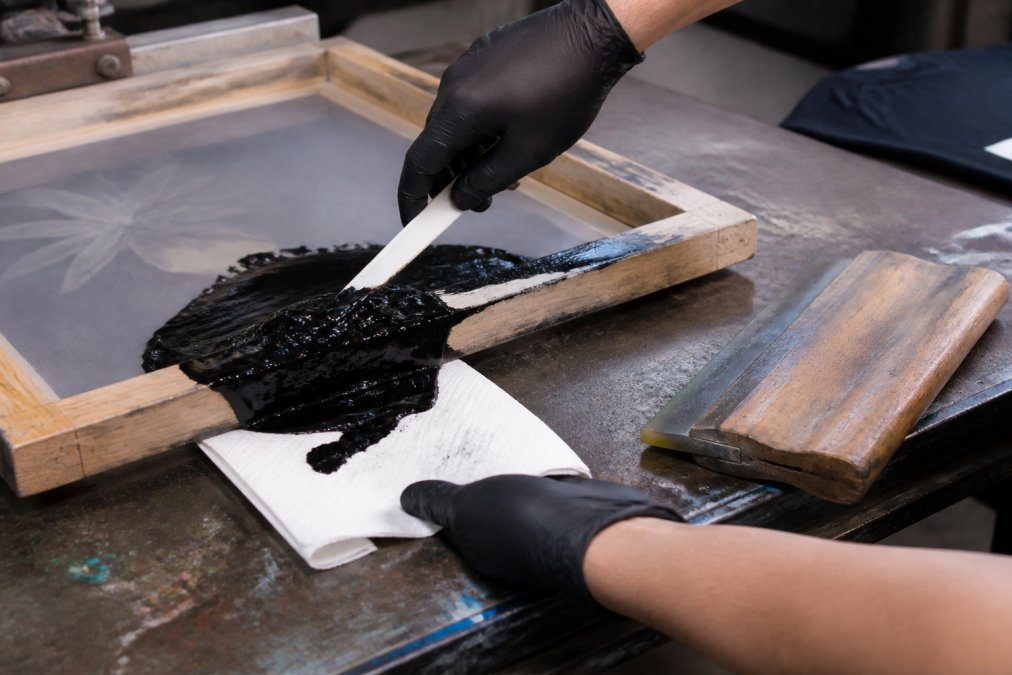
This mechanical step removes the bulk of the ink before any chemical touches the mesh. Professional workflows prioritize it because it cuts waste and reduces how much cleaner you need (press wash and carding workflow).
Do it while the ink is still wet. Once plastisol sits and skins over, carding turns into scraping, and scraping damages mesh.
Step 2: Match Your Cleaning Chemistry to the Ink
The right cleaner depends entirely on the ink you printed. Using the wrong one wastes product and can harm the screen.
Plastisol, Water-Based, and Solvent Ink Removal
Plastisol is the most common textile ink, and it needs a press wash made for plastisol. Water-based inks rinse with water while still wet but need a different approach once cured. Solvent inks require a solvent-specific remover.

Here is how the three ink types compare:
Ink Type |
Best Cleaner |
Watch Out For |
|---|---|---|
Plastisol |
Textile press wash |
Ghosting if left to sit |
Water-based |
Water, then press wash |
Dries into mesh fast |
Solvent |
Solvent ink remover |
Harsh fumes, needs ventilation |
For plastisol jobs, McLogan Textile Press Wash is built for exactly this. It works as a press wash between color changes and as a screen opener during long runs. Apply it to both sides of the screen, then wipe or squeegee off until the residue is gone.
Mclogan Textile Press Wash for Plastisol Screens
McLogan Textile Press Wash removes plastisol inks and protects the fabric from deep stains and ghosting. That protection matters later, when full reclamation comes around.
You can apply it by hand with a towel, spray it on, or run it through a recirculating cleaner. For recirculation, card the excess ink first, then let the product cycle until it gets too heavy with solids. Used wash can be filtered and reused.
Mclogan Universal Press Wash for Plastisol and UV Inks
If your shop runs both plastisol and UV inks, McLogan Universal Press Wash covers both. It dries fast, which keeps production moving between jobs.
The application is the same: apply to both sides, then wipe or squeegee until all residue is gone. It also works as a screen opener for continuous printing and in recirculating systems.
Screen Printing Ink Removal Best Practices That Protect Mesh
Mesh count is the variable most guides skip, and it changes almost everything about how you clean.
Matching Chemistry to Emulsion Type
Emulsion Type |
Generally Compatible With |
Use Caution With |
|---|---|---|
Dual-cure |
Most textile press washes |
Prolonged solvent soaks |
Photopolymer |
Water-based and mild press washes |
Harsh solvent blends |
Diazo |
Mild press washes, short dwell |
Strong solvents, long dwell |
Capillary film |
Manufacturer-recommended cleaners |
Abrasive pads, high pressure |
Safety Precautions and PPE
Always wear nitrile gloves and eye protection when handling press wash or ink remover. Work near open ventilation or a fume hood. Keep a lid on solvent containers when they are not in use.
- Never use acetone or nail polish remover on a screen
- Keep cleaners off the frame adhesive
- Store solvents away from heat
- Dispose of used product per state and federal rules
Household solvents are a common shortcut, and a common mistake.
How to Clean Dried Ink Off a Screen
Dried ink needs more patience, not more force. The order of operations matters as much as the chemistry: card what you can lift, soften what remains, then rinse. Skipping the softening step and going straight to scrubbing is how mesh gets torn and stencils get abraded.
Start by carding whatever you can lift with a plastic spatula. Dried plastisol often releases in flakes rather than a smooth film, so work slowly and let the card do the lifting rather than digging into the mesh.
Dwell Time by Mesh Count
Mesh Count |
Typical Dwell for Dried Plastisol |
Pressure |
|---|---|---|
110-156 |
1-2 minutes |
Moderate fan spray |
160-230 |
2-4 minutes |
Low fan spray |
250-305 |
4-6 minutes, reapplied as needed |
Very low, rinse-dominant |
Working Through Stubborn Plastisol
For stubborn plastisol, a one-step cleaner like EasiStrip SUPRA dissolves ink, emulsion, and blockout together. Mix it up to 1:5 with water in a dip tank, soak the screen for a couple of minutes, then rinse with pressure.

Solvent Ink Residue
For solvent inks, Franmar Wash Away Solvent Ink Remover replaces acetone and mineral spirits with a soy-based formula. Spray it on, scrub with a dedicated pad, then rinse both sides. Do not let it sit on the frame adhesive.
Ghosting and Long-Term Stencil Breakdown
Ghosting is what happens when ink residue stays in the mesh after cleaning and oxidizes into a faint image that shows up on the next print. It is most common on high-mesh screens and on screens where dried ink was scrubbed off dry instead of softened first. Over time, the same habits that cause ghosting also break down the stencil edges, which is why shops that clean immediately after every run get more reclaims out of each screen than shops that let screens sit.
How to Clean Ink Off Screen After Printing Without Damaging Emulsion
Protecting the emulsion comes down to three habits: right chemistry, short dwell, and low pressure. The stencil is the most fragile part of the screen, and it fails fast under the wrong conditions.
A few rules keep emulsion intact:
- Match the cleaner to the ink, never the other way around
- Keep dwell time short unless the product calls for a soak
- Use a fan spray, not a pinpoint jet
- Scrub with a screen-safe pad, not steel wool
- Rinse both sides evenly
For a greener option, soy-based removers break down solvent inks without harsh fumes.
Cleaning screens well is a habit, not a one-time task.
Frequently Asked Questions
What is the best way to remove ink from a screen without damaging the emulsion?
Card off excess ink first, then apply a press wash made for your ink type. For plastisol, use McLogan Textile Press Wash ($17.50) on both sides of the screen and wipe or squeegee until residue is gone. Keep solvent off the glued edges where mesh meets the frame, and never let cleaner sit. Follow with a pressure rinse. This keeps the stencil intact so you can reclaim the screen later instead of losing it.
How do I remove dried ink from a screen?
Dried plastisol needs a stronger approach than wet ink. Card what you can, then apply a press wash like McLogan Universal Press Wash ($15.95) or EasiStrip SUPRA One Step Ink Cleaner & Emulsion Remover ($15.47), which dissolves plastisol and water-based ink, blockout, and emulsion. Let it dwell, scrub with a dedicated pad, and rinse both sides with pressurized water. For solvent-based inks, Franmar Wash Away Solvent Ink Remover ($23.50) breaks down dried ink without acetone or mineral spirits. Never scrape dried ink with a razor, which cuts mesh.
Can I use household cleaners like acetone or nail polish remover to clean screen printing ink?
Household solvents can damage screen mesh and break down the emulsion stencil prematurely, which shortens screen life and causes leaks. Dedicated products are safer and more predictable. EasiStrip SUPRA ($15.47) has no VOCs, no flashpoint, and no hazardous substances, so it is safer for handling and rag disposal than acetone. Franmar Wash Away ($23.50) is biodegradable and made with American-grown soybeans. Both replace harsh solvents while still dissolving plastisol, water-based, and solvent inks.
How often should I clean my screens during a print run?
Clean whenever you change colors or pause for more than a few minutes. Plastisol sits on the mesh and skins over quickly, so a quick press wash between jobs prevents ink from drying in the image area. Use McLogan Textile Press Wash ($17.50) as a press wash and screen opener, or McLogan Universal Press Wash ($15.95) for plastisol and UV inks. Card excess ink first, wipe both sides, and squeegee off residue. Screens cleaned on this schedule reclaim faster and resist ghosting and haze.


