

Last Updated: November 5, 2026
Quick Summary
Polyester vs cotton comes down to absorbency: cotton drinks plastisol ink into the fiber for a soft, forgiving print with a wide cure window, while polyester resists absorption and risks dye migration, so it needs low-bleed plastisol, a bleed-blocker underbase, and tighter cure control. Match ink to fiber first, then tune mesh, squeegee, and flash.
- Cotton's porous cellulose locks in standard plastisol, while smooth polyester leaves ink sitting on the surface.
- On polyester, use roughly 156 to 200 threads per inch for underbases and 230 to 305 for top colors.
- Flash polyester ink just until it gels, looking dull rather than glossy, before printing the next screen.
- Treat 50/50 blends as synthetics for bleed risk and choose ink by polyester percentage, not cotton percentage.
- Wash and dry a test print on the actual garment before every new polyester style run.
Table of Contents
- Polyester vs Cotton: Quick Comparison for Screen Printers
- How Cotton and Polyester Absorb Ink Differently
- Ink Compatibility: Plastisol Choices for Each Fabric
- Dye Migration in Polyester Screen Printing: Causes and Fixes
- Screen Printing Cure Temperature for Polyester vs Cotton
- Screen Printing on Cotton Polyester Blend Garments
- Screen Printing on Polyester Shirts: Production Workflow and Troubleshooting
- Stocking Your Shop for Both Fabrics at McLogan
- Frequently Asked Questions
Polyester vs Cotton: Quick Comparison for Screen Printers
Polyester vs cotton is the first decision behind almost every print problem, and the short answer is this: cotton absorbs plastisol ink into the fiber and holds it, while polyester resists absorption and fights back with dye migration and heat sensitivity. Cotton gives you a forgiving surface, soft hand, and predictable cure. Polyester gives you durability and moisture performance, but demands low-bleed ink, tighter temperature control, and a disciplined test print before any production run.
That trade-off shapes everything below, from ink selection to cure settings to how you set up a press for a 50/50 blend.
Factor |
Cotton |
Polyester |
|---|---|---|
Ink absorption |
High; fiber drinks ink |
Low; ink sits on surface |
Best ink type |
Standard plastisol |
Low-bleed plastisol |
Dye migration risk |
Minimal |
High on dark colors |
Cure window |
Wide |
Narrow; heat sensitive |
Print feel |
Soft, matte |
Can be glossy or stiff |
Durability |
Good, fades over time |
Excellent, resists moisture |
Best for |
Retail tees, promo |
Sportswear, performance wear |
How Cotton and Polyester Absorb Ink Differently
Cotton is a natural cellulose fiber with a porous, absorbent structure, so plastisol ink mechanically locks into the yarn and cures into a smooth film. Polyester is a synthetic fiber, smoother and non-porous, so ink rests on top of the fabric instead of sinking in. That single difference explains most of what follows: lower ink deposit on polyester, more surface texture showing through, and a greater need for a proper underbase when you print light ink on a dark shirt.
The absorbency gap also affects how the print looks and feels after washing. Cotton prints tend to soften and stay put. Polyester prints can show fibrillation, where individual fibers poke through the ink film and create a fuzzy, dull appearance. A common mistake is treating polyester like cotton and pulling a heavy deposit to compensate, which builds up ink, stiffens the print, and makes curing harder to control.
Ink Compatibility: Plastisol Choices for Each Fabric
Plastisol is the workhorse ink for both fabrics, but the formulation matters more than most shops admit.
The practical split is straightforward. For 100% cotton, a standard plastisol white and standard color set cover retail tees, promotional shirts, and most workwear. For 100% polyester, reach for a low-bleed plastisol formulated to resist dye migration, and pair it with a bleed-blocker underbase on dark or saturated garments.
Settings matter as much as the ink.
A useful way to think about it: match ink to fiber first, then tune mesh, squeegee, and flash to the fabric's surface. Getting that order right saves more ruined shirts than any press adjustment.
Why International Coatings Unicorn White Belongs in Every Polyester Shop
Unicorn White from International Coatings is a plastisol ink option for polyester work. Keep a test print on hand to confirm adhesion before each new garment lot. You can view the Unicorn White product to check specs and add it to your next order.

For shops comparing plastisol options for polyester work, our 741 Polyester White Plastisol is built for exactly that job, and you can browse the full International Coatings range to match ink to fabric across a mixed production schedule. Keep standard plastisol on the shelf for cotton and low-bleed plastisol plus a blocker for polyester, and you cover most mixed runs without doubling your inventory.

Dye Migration in Polyester Screen Printing: Causes and Fixes
Dye migration in polyester screen printing is the bleeding of fabric dye into the cured ink film, and it can show up as a color shift in a white or light print.
Dye migration is often noticed by eye after the fact. A better approach is a short, repeatable test before any production run:
- Print a test piece on the actual garment. Use the exact ink, mesh, and squeegee you plan to run, and include a white or light color over the darkest area of the shirt.
- Cure it the way you will cure the run. Verify film temperature with a probe or test strip rather than trusting the dryer dial.
- Wash and dry the test piece. Run it through a normal home wash and dry cycle, heat in the dryer is what often triggers a shift that did not show coming off the belt.
- Compare against a control. Keep an unwashed print beside the washed one and check for color shift, gloss change, and adhesion loss.
If the washed print shifts, work through a decision path rather than guessing:
- First, confirm the cure. An under-cured film is more porous and takes up more dye. If the film did not reach temperature, fix the cure before changing ink.
- Second, add or upgrade the blocker. A bleed-blocker underbase traps migrating dye before it reaches the top colors. On dark polyester, print a thin, even blocker coat, gel it, then print the white or color on top.
- Third, switch to a low-bleed plastisol. If a blocker alone does not hold, move the white and light colors to a low-bleed formulation built for polyester, such as the 741 Polyester White Plastisol, and keep Unicorn White from International Coatings as the bright standalone white on lighter garments.
- Fourth, change the garment. If a particular style still shifts after a blocker and a low-bleed ink, the dye package in that fabric is too aggressive for the print. Test an alternate style from the same mill before committing a run.
Watch out: a print that looks perfect coming off the dryer can shift color after its first wash, so never skip the wash test on a new polyester style, and never assume two shirts labeled the same color from different mills will behave the same way.
Unicorn White Low Bleed Plastisol →
Prevention still comes down to the same three levers, a low-bleed or blocker ink, the lowest cure temperature the ink allows, and a test print on the actual garment, but the test-and-decide sequence above is what turns those levers into a repeatable workflow instead of a coin flip.
Screen Printing Cure Temperature for Polyester vs Cotton
Cure temperature is where polyester and cotton part ways most sharply. Cotton tolerates a wide cure window, so standard plastisol cures fully without stressing the fabric. Polyester can be heat sensitive, so verify cure temperature carefully.
Follow the ink manufacturer's cure range and verify it with a temperature probe or test strip rather than trusting the dryer's dial. Check the ink manufacturer's listing for the cure range that applies to your ink. If you are coming from cotton-only work, expect to slow your belt speed and check the entire ink film reaches temperature, not just the surface.
Screen Printing on Cotton Polyester Blend Garments
Screen printing on cotton polyester blend garments is a middle path: the cotton content aids ink absorption while the polyester adds durability. A 50/50 blend behaves closer to polyester for bleed risk, so treat it as a synthetic and use low-bleed ink. A tri-blend, with its heavier synthetic content, is softer and stretchier and needs a ink that moves with the fabric.
Blend ratio changes the plan. Higher cotton content means more forgiving absorption and a wider cure window. Higher polyester content means tighter temperature control and a greater chance of dye migration on dark colors. Test each blend separately, because two shirts labeled the same ratio from different mills can print very differently.
Screen Printing on Polyester Shirts: Production Workflow and Troubleshooting
Screen printing on polyester shirts rewards a repeatable workflow over improvisation. Here is the sequence we recommend, with the settings that matter most.
- Test print first. Print a sample on the actual garment and wash test it before the run.
- Load with the right adhesive. Use a high-tack pallet adhesive suited to polyester and performance fabrics so the shirt stays put.
- Print a low-bleed underbase. Lay down a thin, even white, then flash just until it gels.
- Print colors at moderate mesh counts. Avoid over-depositing ink that stiffens the hand.
- Cure within the ink's range. Verify film temperature, not just dryer settings.
- Inspect and wash test a finished piece. Confirm no dye migration and solid adhesion.
For shops running long days, keeping the press in shape matters as much as the ink. Our guide on how to maintain a screen printing press covers the practical checks that prevent mid-run breakdowns.
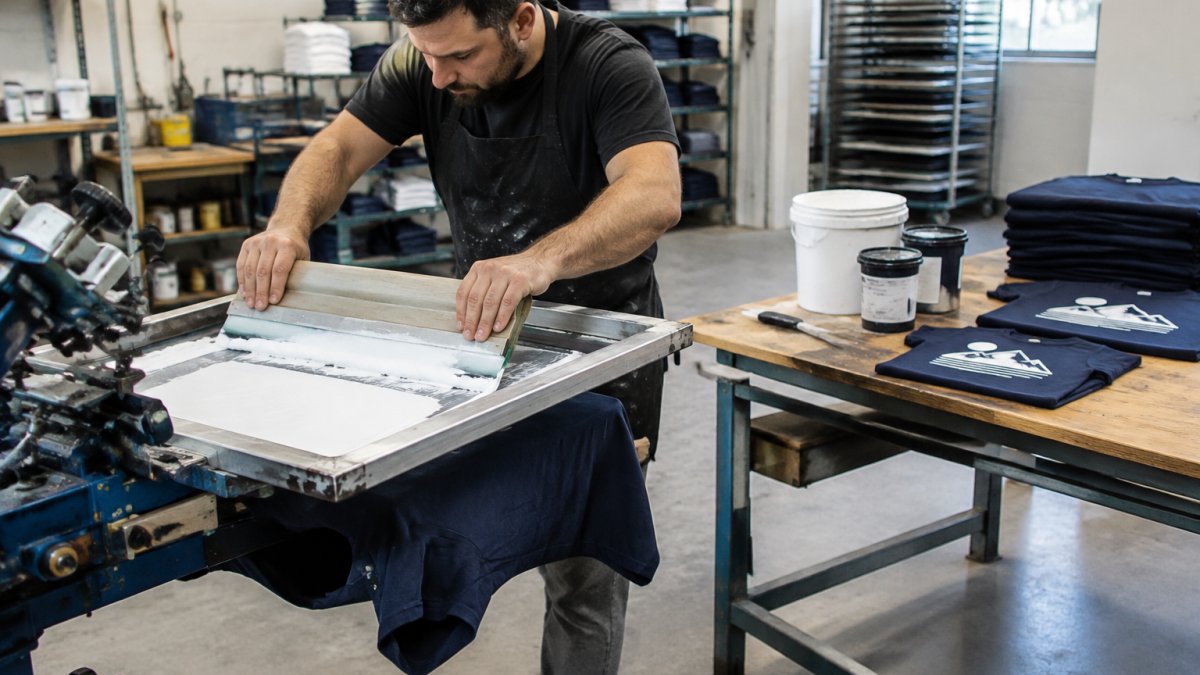
The man is American.
Stocking Your Shop for Both Fabrics at McLogan
Stocking for both fabrics means carrying two ink strategies, not two separate shops. Keep standard plastisol for cotton and a low-bleed white plus a blocker for polyester, and add a high-tack pallet adhesive for synthetic garments. That small inventory split covers most mixed production schedules without doubling your shelf space.
At McLogan, we have supplied screen printing and signage shops since 1922, and our team can help you match ink, mesh, and cure settings to the garments you actually run. If you are building out your supply list, our article on the best suppliers for screen printing supplies walks through what to prioritize.
Frequently Asked Questions
Can you screen print on 100% polyester fabric?
Yes, but it takes the right ink and settings. Standard plastisol can discolor when polyester dyes bleed into the ink film, so use a low-bleed white like International Coatings Unicorn White as an underbase. Keep cure temperatures in the 315°F to 330°F range, test print every fabric lot for adhesion and bleed, and wash test before a full production run. Polyester also needs a pallet adhesive built for slick synthetic fabrics, such as Tekmar Tb-Ez High Tack.
What ink should you use for screen printing on polyester?
Use a low-bleed plastisol formulated for synthetic fabrics. International Coatings Unicorn White is one plastisol option for polyester and 50/50 blends. For nylon and some blends, a catalyzed system like Nylon 900 Series works, but it is not a low-bleed ink, so test bleed resistance first. Add Nylon Bonding Additive at 5-10% by weight when adhesion on synthetics is the concern.
How do you prevent dye migration when screen printing polyester?
Start with a low-bleed white underbase and keep your cure as cool as the ink allows. Dye migration in polyester screen printing happens when disperse dyes in the fabric sublimate into the ink film, usually during curing or in storage. Print a bleed-blocking underbase, cure within the ink's listed range, and run a wash test. Dark polyester colors, especially reds and navies, are the highest risk.
Does screen printing last longer on cotton or polyester?
Both hold up well when printed and cured correctly, but the failure modes differ. Cotton prints bond mechanically into the fiber and rarely bleed, so durability depends mostly on proper cure. Polyester prints can be more vulnerable to dye migration and adhesion problems, so test each fabric before a run.
Can you use the same screen-printing process for cotton and polyester?
The press, screens, and squeegee are the same, but the ink, underbase, cure temperature, and pallet adhesive change. Cotton accepts standard plastisol; check the ink's listed cure range. Polyester needs a low-bleed underbase, a cooler cure window, and a high-tack adhesive for slick fabrics. Always test print each fabric lot before a production run, and wash test the first piece off the press.
The challenge is not choosing between cotton and polyester, it is running both without ruining either. McLogan stocks the low-bleed plastisols, pallet adhesives, and International Coatings inks that keep polyester production clean, backed by a team that has guided printers since 1922. Get started with McLogan and build a supply setup that handles cotton and polyester on the same press.


