

Last Updated: November 26, 2026
Quick Summary
A wide format printer is an inkjet printer that produces prints wider than standard letter or tabloid sheets, usually 24 inches or more, and handles roll media for posters, banners, decals, and vehicle graphics. Before buying, confirm the ink system, since it determines which films, papers, and vinyl the printer can run.
- Measure your five most common job sizes before comparing print widths.
- Confirm the ink type first, because it locks you into a specific media family.
- Eco-solvent ink suits sign shops because it handles outdoor exposure on vinyl and banners.
- Compare total cost per sellable square foot, including ink, media, maintenance, and downtime.
- Verify part numbers and compatible inks for your model before topping off or replacing parts.
Table of Contents
- What Counts as a Wide Format Printer
- Choosing a Print Width: Why 24-Inch Is Not the Only Answer
- Small-Format Options: When a 13x19 Printer Makes Sense
- Ink Tank Systems vs. Cartridge Printers
- Matching Your Printer to Your Media and Ink
- Total Cost of Ownership and Maintenance
- Choosing Your Next Wide Format Printer With McLogan
- Frequently Asked Questions
What Counts as a Wide Format Printer
A wide format printer is an inkjet printer that produces prints wider than the standard letter or tabloid sheet. In most shops, the term covers machines with print widths of 24 inches or more, though the exact cutoff depends on who you ask.
Wide format printers come in several technologies. Solvent, eco-solvent, UV, latex, and dye-sublimation machines each use different inks, and each ink works with a specific group of media.
McLogan's team can help you sort through those differences. The 64-inch Sts Xpj 1682d 64 Inch Dtf Printer shows what a machine at the larger end of the wide format range looks like in practice, which is a useful reference point when you're deciding how much width you need.
Choosing a Print Width: Why 24-Inch Is Not the Only Answer
Print width is the first spec most buyers check, and it's a sensible place to start. A 24-inch printer suits small signs, labels, and point-of-purchase graphics.
Width is not the only factor. A wider printer takes up more floor space, needs more clearance for roll loading, and often costs more to run.
We recommend listing your five most common job sizes before you compare machines. That list will tell you whether a 24-inch model covers your work or whether you need to plan for something wider.
Small-Format Options: When a 13x19 Printer Makes Sense
Not every shop needs a roll-fed machine. For a side-by-side look at choosing between production methods for small startups, read our comparison guide.
Small-format printers have clear limits. They can't run roll media, and they won't handle banners or large display graphics.
Many buyers use a small-format printer alongside a larger one. The smaller machine handles proofs and quick jobs, while the wide format printer handles production.
Ink Tank Systems vs. Cartridge Printers
Ink delivery and ink chemistry are two separate decisions, and buyers often blur them together. Get both right and the printer fits your work for years. Get either wrong and you end up buying media the machine can't cure or refilling cartridges every other job.
Ink chemistry first
The ink type sets what you can print on and how long the print lasts outdoors. The main families you'll see in wide format inkjet printers:
- Aqueous dye, bright, wide color gamut, low cost per print, but fades quickly outdoors and needs coated or specially treated media. Common in proofing and short-term indoor graphics.
- Aqueous pigment, better fade resistance than dye, still indoor-leaning, and used heavily for CAD drawings, posters, and fine-art papers. Pigment inks sit on the coating rather than soaking in, so media selection matters.
- Eco-solvent, the workhorse for sign shops. Bonds to uncoated vinyl and banner material, handles outdoor exposure, and cures with heat. Needs compatible eco-solvent media and proper ventilation.
Each chemistry locks you into a media family. Aqueous printers won't run uncoated banner vinyl, and eco-solvent printers won't produce the same result on plain bond paper. Confirm the ink type before you shop for media, not after.
Then ink delivery
Once you know the chemistry, the delivery system decides your day-to-day cost and workflow:
- Cartridge printers use sealed cartridges you swap when empty. Simple, low mess, and easy to budget per job. Cost per milliliter is higher, and cartridge swaps interrupt production.
- Ink tank systems use refillable reservoirs that hold far more ink. Cost per milliliter is lower and you can top off between jobs, which suits high-volume shops. The tradeoff is discipline: tanks need regular level checks, and running one dry mid-job can pull air into the lines and cost you a printhead or a service call.
- Bulk ink and bag systems sit between the two, using larger sealed bags or bottles that feed the head through tubing. Common on production machines where uptime matters more than per-job simplicity.
Matching delivery to your workload
Ask three questions before you commit:
- How many square feet do you print in a typical week? Under a few hundred, cartridges are usually easier to manage. Above that, tank or bulk systems tend to make more sense.
- How often can you check ink levels? Tank systems reward a routine. If nobody owns that task, cartridges are safer.
- What does a mid-job ink-out cost you? On a tight deadline with a wrap or banner on the table, downtime hurts more than the ink savings.
Watch out: refilling a tank with the wrong ink type or a third-party ink the manufacturer hasn't approved can void coverage and contaminate the lines. Confirm the exact ink part number for your model before you top off.
Replacement parts follow the same logic. A printhead, capping station, or ink line is specified for a particular model and ink family, so verify the part number against your machine's documentation rather than assuming a similar-looking component will fit.
The article breaks ink choice into two decisions, chemistry and delivery, which are summarised below.
| Ink type | Best for | Key difference |
|---|---|---|
| Aqueous dye | Proofing and short-term indoor graphics | Bright and low cost, but fades outdoors |
| Aqueous pigment | CAD drawings, posters, fine-art papers | Better fade resistance, indoor-leaning |
| Eco-solvent | Sign shops, vinyl and banners | Handles outdoor exposure, needs ventilation |
| UV-curable | Decals and rigid signs | Cures instantly under UV lamps |
| Latex | Shops with limited ventilation | Water-based, heat-cured, low odor |
| Sublimation | Polyester and coated substrates | Needs transfer paper and a heat press |
Matching Your Printer to Your Media and Ink
Your printer, ink, and media have to work together. A printer that runs eco-solvent ink needs eco-solvent-compatible media, and the same goes for solvent, UV, and latex systems.
Start by confirming the ink type your printer uses, then look for media rated for that ink. The Eufymake White and Glossy Ink Cleaning Cartridge Kit for UV Printer E1 is an example of the maintenance products that keep a UV printer running properly.
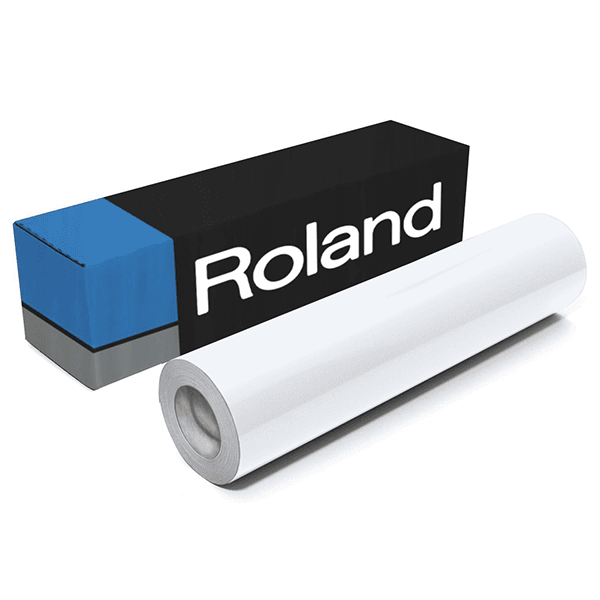
For banners, outdoor signage, and vehicle graphics, media choice matters as much as the printer itself. Our Digital Banner Material 13oz and Roland Light Weight Banner Vinyl 13oz are both built for the banner work that many sign shops run every week. Indoor poster work calls for different media, such as the Roland Premium Matte Paper PMP, which is designed for high-resolution eco-solvent printing and a smooth, non-glare finish.
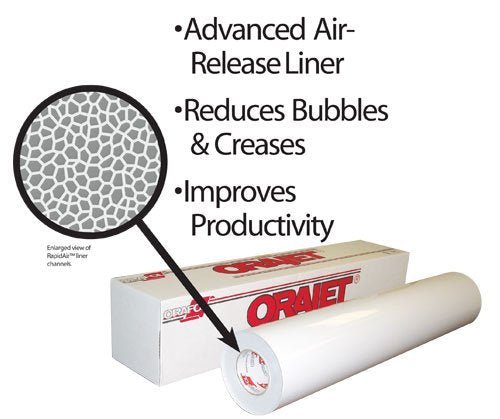
For vehicle graphics, check adhesive type and durability ratings carefully. The 3551RA Orajet High Performance Inkjet Media with Rapid Air Technology lists its durability as conditional on climate zone, exposure, and installation.
Finishing matters too. Some printed media need time to fully cure before lamination or installation, and manufacturer guidance on storage and acclimation should be followed.
Total Cost of Ownership and Maintenance
Purchase price is the smallest part of what a wide format printer costs you. The number that matters is cost per square foot of sellable output over the life of the machine. Break it into five buckets and you can compare two printers on equal footing instead of on sticker price.
The five cost buckets
- Ink, measured in milliliters per square foot. Coverage, white or clear ink use, and print mode all move this number. A machine that lays down less ink per square foot at production quality has a real advantage on long runs.
- Media, usually the largest recurring cost. Banner material, vinyl, and specialty stocks vary widely by width, finish, and durability rating. Buy media sized to your printer's width so you're not paying for trim waste.
- Maintenance parts, printheads, capping stations, wipers, dampers, and ink lines wear on a schedule. Ask for the expected replacement interval and part cost for each before you buy.
- Consumables tied to the process, cleaning solution, swabs, waste ink pads, and (for UV) lamp life. These are small line items that add up quietly.
- Downtime, the hardest to budget and the easiest to underestimate. A machine that needs frequent head cleanings or service calls costs you jobs, not just parts.
Build a real cost per square foot
You don't need a spreadsheet to get close. For a given job:
- Multiply ink cost per square foot by the run size.
- Add media cost per square foot (divide roll price by usable square feet).
- Add a maintenance allowance based on the part intervals you were quoted.
Run that math on your three most common jobs, not on a hypothetical banner. The printer that wins on your actual mix is the one worth buying.
Maintenance cadence that prevents downtime
Most wide format problems trace back to skipped routine care rather than failed hardware. A practical weekly routine:
- Daily, check ink levels and waste ink container; run the manufacturer's nozzle check before the first job.
- Weekly, clean the capping station and wiper, inspect the printhead surface, and confirm the media feed path is free of dust and adhesive residue.
- Monthly, review error logs, check for ink buildup on the carriage, and verify the environment (temperature and humidity) stays within the manufacturer's range.
Watch out: leaving a printer idle for long stretches is one of the most common causes of clogged nozzles and dried ink in the lines. If your production is seasonal, follow the manufacturer's storage and maintenance-station guidance rather than just powering down.
Comparing machines fairly
When you line up two printers, compare them on the same four numbers: ink cost per square foot at your typical print mode, media cost for the widths you actually run, expected maintenance part cost over three years, and realistic throughput on your jobs. Advertised top speeds are useful context but rarely match production output once you account for setup, media changes, and finishing. Build your estimate from your own test prints and your own job mix, and treat any published speed or cost figure as a starting point to verify.
If you're weighing a specific machine, contact McLogan to review the consumables and media that go with it before you commit.
Choosing Your Next Wide Format Printer With McLogan
The right wide format printer depends on your work, not on the most expensive machine on the list. Start with your common job sizes, your media needs, and your production volume.
McLogan has supplied the printing industry since 1922. Our team can help you compare equipment and supplies and confirm compatibility.
Not sure which printer or media fits your application? Contact McLogan for help choosing the right option.
Frequently Asked Questions
What is considered a wide format printer?
A wide format printer is a large-format inkjet printer that prints on roll media or large sheets, typically 24 inches wide or more. Common sizes include 24-inch, 36-inch, 44-inch, and 64-inch models. Sign shops, decorators, and display makers use them for banners, decals, posters, vehicle graphics, and point-of-purchase displays. Smaller printers that handle 13x19-inch sheets are sometimes grouped with wide format models for light work, but they are better described as tabloid or small-format devices.
What is the main disadvantage of inkjet printers?
The main disadvantage is ongoing ink and maintenance cost. Inkjet printers can be inexpensive to buy but costly to run when cartridges or ink bottles are replaced frequently, and printheads can clog if the printer sits unused. Ink tank systems reduce cost per print for many shops, but you still need a regular cleaning and maintenance routine to keep output consistent.
What should I compare when choosing a wide-format inkjet printer?
Start with print width, which must match the largest media you plan to run. Next, check the ink type, since eco-solvent, UV, and latex inks are not interchangeable and require compatible media. Look at the media handling features, such as roll capacity and take-up options. Finally, weigh cost per square foot, service and training availability, and whether the printer fits your production volume. The right answer depends on your work, not the highest specification on the spec sheet.
What supplies do I need to run a wide-format inkjet printer?
You need compatible ink for your printer's ink system, printable media matched to that ink, and the right laminate if the finished piece will be exposed outdoors. Cleaning supplies, lint-free cloths, and maintenance fluids are also part of normal operation. McLogan carries media such as Orajet 3164 and 3640 calendered PVC, Roland Premium Matte Paper, and Digital Banner Material. Always confirm the ink and media combination with the manufacturer before production.


