

Last Updated: October 22, 2026
Quick Summary
Scaling promotional product printing in 2026 means building repeatable B2B order workflows, not just buying faster machines. Fix the constraint before adding capacity: standardize quoting, artwork intake, and job costing first, then add equipment when booked hours and on-time delivery data justify it.
- The U.S. distributor promotional-products industry is estimated at $28.6 billion in annual sales revenue.
- Upgrade the press only after order intake and art approval stop being the bottleneck.
- A dual-station heat press removes operator idle time at 50+ transfers per day.
- Track gross margin per job, not per month, and review the ten lowest-margin jobs monthly.
- Add space and staff last, once on-time delivery holds above target for two quarters.
Table of Contents
- Why Scaling a Promotional Product Printing Business Looks Different in 2026
- Screen Printing Business Equipment: What to Upgrade First
- Print Shop Workflow Optimization That Holds Up Under Volume
- Unit Economics and Job-Level Profitability for Promotional Product Printing
- Marketing Strategies for Printing Businesses That Bring Repeat B2B Orders
- Print-on-Demand Business Growth: Adding Low-Risk Revenue
- A Staged Scaling Roadmap: When to Add Equipment, Staff, and Space
- Frequently Asked Questions
Why Scaling a Promotional Product Printing Business Looks Different in 2026
Scaling a promotional product printing business in 2026 means building repeatable B2B order workflows, not just buying faster machines. The U.S. distributor promotional-products industry is estimated at $28.6 billion in annual sales revenue (SellersCommerce promotional products industry data), and the buyers behind that number expect faster turnarounds, smaller runs, and cleaner artwork files than they did five years ago.
At McLogan, we have supplied presses, emulsions, and heat transfer equipment since 1922, and the shops that grow predictably share one habit: they fix the constraint before they add the capacity. Below, we break down the equipment upgrades, workflow changes, and unit economics that separate shops doubling revenue from shops doubling headaches.
Screen Printing Business Equipment: What to Upgrade First
Upgrade the press only after order intake and art approval stop being the bottleneck. Screen printing business equipment decisions should follow volume data: if you are turning away jobs or running overtime on a manual press, an automatic is justified.
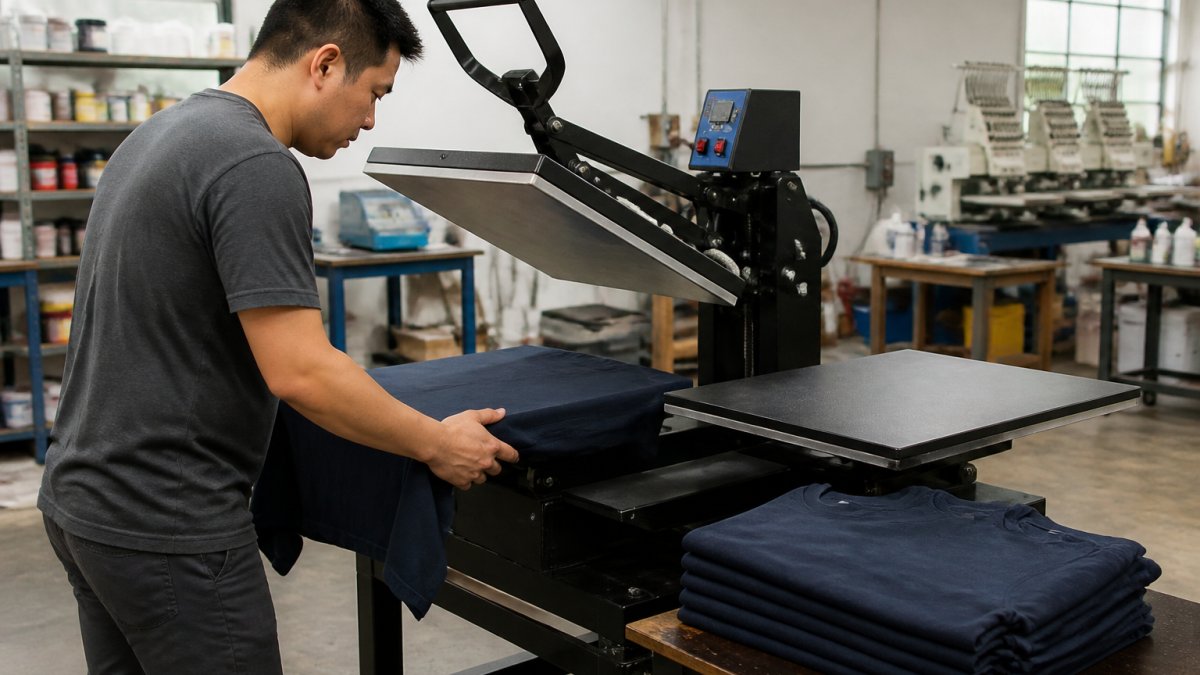
Automatic Presses and Heat Press Upgrades
An automatic press pays for itself through consistency and throughput, but heat transfer work often scales first because setup is faster. The ROQ YOU automatic press gives growing shops touchscreen control and repeatable registration without a steep learning curve.
For transfer-heavy promotional work, a dual-station machine removes the dead time between cycles. The Vector 16" x 20" Double Station Auto-Open Heat Press at $1,599 lets an operator load one platen while the other presses. When volume climbs further, the TITAN pneumatic heat press at $3,290 adds air-powered pressure consistency and laser alignment across interchangeable platens.


| Upgrade | Typical Trigger | What It Fixes |
|---|---|---|
| Dual-station heat press | 50+ transfers/day | Operator idle time between cycles |
| Automatic screen press | Consistent multi-color orders | Registration drift, output ceiling |
| Pneumatic press with laser alignment | Multi-operator production | Pressure inconsistency between operators |
| Automated mug press | Repeat drinkware programs | Labor intensity, per-unit cost |
Print Shop Workflow Optimization That Holds Up Under Volume
Print shop workflow optimization starts with mapping every handoff from quote request to shipment, then removing the steps that repeat. Most shops lose hours in three places: artwork approval, screen or transfer prep, and order status communication.

Automation is the lever most shops underuse. Sharp Business USA on workflow automation for print shops notes that automation helps print businesses expand beyond traditional services and grow revenue, and the practical starting point is the quoting and reorder process, not the press floor.
- Standardize a quote template with decoration method, quantity breaks, and turnaround
- Build an artwork checklist so files arrive print-ready
- Set a reorder trigger for repeat customers at 60-90 days
Unit Economics and Job-Level Profitability for Promotional Product Printing
Job-level profitability is the difference between a busy shop and a profitable one. Promotional product printing hides margin leaks in setup time, spoilage, and rush freight, so cost every job by decoration method rather than averaging across the month. Most shops that scale successfully build a job-costing sheet before they buy their next machine, because the sheet tells them which work to chase and which to decline.
Build the cost stack in the right order
Price on fully loaded cost, and build it in this sequence so nothing gets buried in overhead:
- Blank goods and freight in. Landed cost per unit, including inbound freight and any rush surcharge from the supplier.
- Decoration setup. Screen burn, emulsion and reclaim, embroidery digitizing, laser jig setup, or DTF film prep. Setup is a fixed cost per job, so it dominates small runs.
- Run labor. Actual hourly rate times realistic pieces-per-hour, not the best day the shop ever had.
- Equipment time. A per-hour charge that recovers the press, dryer, or embroidery head over its useful life.
- Spoilage allowance. A percentage by method, applied to blanks and decoration labor, not just blanks.
- Outbound freight and handling. Especially for drop-ship and multi-location corporate programs.
- Overhead share. Rent, utilities, software, and front-office labor allocated per job.
A 500-piece order and a 24-piece order rarely share the same margin even at the same unit price, because setup and spoilage are spread over very different quantities.
Decoration method changes the math
Each decoration method has a different fixed-versus-variable cost profile, and that profile should drive which jobs you quote aggressively:
| Method | Setup cost profile | Run cost profile | Where margin hides |
|---|---|---|---|
| Screen printing | High per color (screen burn, setup, reclaim) | Low per unit at volume | Color count creep and small runs |
| Embroidery | Digitizing charge per design | Stitch count drives run time | Thread breaks, backing waste, hoop changes |
| Laser engraving | Jig and file setup | Low per unit, machine-time bound | Rework on curved or coated items |
| DTF transfer | Film prep and powder handling | Consumable-heavy per unit | Film waste, powder cost, press time |
| Pad printing | Plate and cliché setup | Fast per unit on small parts | Ink mixing and color matching |
Screen printing rewards volume and punishes color count. Embroidery rewards simple logos and punishes stitch-heavy artwork. DTF rewards short runs and punishes sloppy film handling. Quoting all three at the same markup is how a shop ends up with strong revenue and weak cash flow.
Setup charges, spoilage, and break-even
Setup charges exist to protect margin on small orders.
Spoilage is the quiet killer. Every decoration method has a realistic reject rate, and it should be built into the quote rather than absorbed after the fact.
Break-even volume is the quantity at which a job covers its setup, spoilage, and overhead share. Below break-even, the job only makes sense if it opens a repeat program or fills otherwise-idle capacity.
Marketing Strategies for Printing Businesses That Bring Repeat B2B Orders
Marketing strategies for printing businesses should target procurement managers, not consumers. B2B buyers care about turnaround reliability, artwork support, and reorder ease, so lead with those proof points instead of design awards.
The Screen Printing Magazine coverage of shifting print-shop demand reports that customers expect more product choices, less waste, and fewer inventory-management burdens, including runs of one. That favors shops that publish clear minimums and reorder paths.
- Publish a turnaround guarantee and track against it
- Build a reorder portal or saved-artwork library
- Send seasonal reminders tied to corporate event calendars
Print-on-Demand Business Growth: Adding Low-Risk Revenue
Print-on-demand business growth gives promotional printers a way to test products without inventory risk. Global print-on-demand revenue is reported at $16.44 billion and projected to reach $118.85 billion by 2035 (Printful print-on-demand market data), and Mimeo on print-on-demand fulfillment frames automated fulfillment as the scaling benefit.
For a promotional shop, DTF is the practical entry point. The Prestige R2 Pro Shaker Bundle at $10,784.99 pairs a dual-head DTF printer with a powder shaker, RIP software, and mandatory training, which matters because DTF quality depends on process discipline as much as hardware.
A Staged Scaling Roadmap: When to Add Equipment, Staff, and Space
Add equipment when a measured constraint caps revenue, add staff when one person becomes the constraint, and add space last. A staged roadmap keeps capital tied to demand instead of hope. The roadmap works only if each stage has a trigger you can measure, so define the metrics before you need them.
The metrics that decide each stage
Track these weekly and review them monthly. They translate growth strategy into operating targets:
- Throughput. Pieces decorated per labor hour, by method. Rising throughput means process is improving; flat throughput with rising volume means you are adding hours, not capacity.
- Quote turnaround. Hours from quote request to quote sent. A common target is one business day for standard work.
- Artwork approval cycle. Days from art receipt to customer approval. This is usually the longest hidden delay in a promotional shop.
A shop that holds on-time delivery above target for two consecutive quarters has earned the right to add capacity. A shop that adds capacity while on-time delivery is falling is buying faster production for a slower front office.
Stage one: validate the front office
Standardize quoting, artwork intake, and job costing. No capital spend. The goal is to make the front office fast enough that production becomes the visible constraint. If quotes sit for two days, the constraint is not the press.
Exit criteria: quote turnaround under one business day, a standard artwork checklist in use, and job costing applied to every job for at least one quarter.
Stage two: relieve the production constraint
Add a dual-station heat press or an automatic press when overtime is routine and utilization on the existing press is consistently high. The trigger is not revenue; it is booked hours against available hours, plus a rework rate that suggests the current equipment cannot hold quality at volume.
Exit criteria: overtime back to normal levels, on-time delivery stable or improving, and throughput per labor hour rising.
Stage three: automate repeat programs
Add automated mug or DTF production when repeat programs justify it. Automation pays back on repeatable work, not on one-off jobs. The trigger is a book of repeat orders with predictable quantities and deadlines, plus a rework rate that automation would reduce.
Exit criteria: repeat-order margin holding or improving, and front-office labor freed from manual order handling.
Stage four: expand space and staff
Add space and staff once on-time delivery holds above target for two quarters and utilization is high enough that new capacity will be absorbed quickly. Space is the last constraint to relieve because it is the least reversible. Staff hires should follow the same logic: add a person when one role is the measured bottleneck, not when the shop feels busy.
The Chipply case study on Worldwide Printing shows the pattern: switching web-store platforms cut store setup time by two-thirds and saved hundreds of hours on purchasing, a front-office gain that funded capacity later. That is stage one doing its job before stage two spends money.
Frequently Asked Questions
What does scaling mean for a promotional product printing business?
Scaling means raising output and revenue without a proportional rise in labor and overhead. In practice that means upgrading equipment so each operator produces more, tightening print shop workflow optimization so jobs move without bottlenecks, and adding channels like print-on-demand that carry little inventory risk. The U.S. distributor promotional-products industry is estimated at $28.6 billion in annual sales in 2026, so the demand is there. The constraint for most shops is production capacity and repeat-order systems, not the market itself.
What equipment helps a small printing business handle more orders?
Start where the bottleneck actually is. If heat transfer is the constraint, a dual-station auto-open press like the Vector 16" x 20" lets one operator press while loading the next item, cutting downtime between cycles. For screen printing volume, an automatic press such as the ROQ YOU adds speed and repeatable registration. Shops adding mugs can move to automated pressing with a machine like the APEX M15, which handles over 230 mugs per hour. Match the upgrade to the job type that is backing up.
Is print-on-demand still profitable in 2026?
Print-on-demand remains a viable low-inventory model, and the global market is reported at $16.44 billion and projected to reach $118.85 billion by 2035, growing roughly 25% annually. Profitability depends on your cost per unit and how much labor the workflow consumes. Automation is the lever: a DTF bundle like the Prestige R2 Pro pairs a printer with a powder shaker and dryer so film production runs with less manual handling. Treat print-on-demand business growth as a way to fill capacity gaps, not replace high-margin bulk orders.
How can a printing business grow without sacrificing print quality?
Standardize the process before you add volume. That means documented settings for time, temperature, and pressure, plus equipment that repeats those settings consistently. A pneumatic press like the TITAN 16" x 20" uses air-powered operation so every transfer gets the same time, temperature, and pressure regardless of who runs it. Pair that with supplier relationships you can rely on and checks at each stage. Quality slips when growth outpaces process, not when growth outpaces equipment.
How should a printing business decide when to add equipment or staff?
Watch for a bottleneck that persists for several weeks, not a single busy season. If one station is consistently the constraint and overtime is eating your profit margin, that is an equipment signal. If jobs queue waiting on hands rather than machines, hire. Run the numbers at the job level first: cost planning should show whether the new capacity pays for itself in added order volume. A staged roadmap, adding one capability at a time, keeps equipment investment proportional to sales growth.
How can a print shop improve turnaround times as order volume grows?
Reduce the time a job spends waiting, not just the time it spends printing. Group similar jobs into batches, keep setup materials staged at each station, and route artwork approvals before production starts. Automation helps: an automatic press with touchscreen control and preset memory slots cuts setup time on repeat orders. Track turnaround time per stage so you can see where jobs sit idle. Most shops find that order processing and approval steps, not the press itself, cause the worst delays.
The hard part of scaling isn't buying the next machine. It's knowing which constraint to relieve first, and that takes honest job costing and a workflow that doesn't break under volume. McLogan has helped printers start and expand since 1922, with professional-grade presses, heat transfer equipment, and DTF bundles backed by staff who know screen printing and sign design. Get started with McLogan and build a production floor that still makes sense when you double your order volume.


